

A digital network is an essential part of modern communication. Whether you are sending an email, accessing a business server, joining a video meeting, using cloud storage, or connecting a smartphone to Wi-Fi, a network is working behind the scenes to move information between devices.
Digital networks are used in homes, offices, schools, hospitals, government organizations, data centers, and many other environments. They allow computers and other devices to communicate, share resources, and access online services efficiently.
Understanding how a digital network works can help individuals and businesses make better decisions about connectivity, performance, security, and future technology investments.
This guide explains the basic principles of digital networking, common network types, essential components, benefits, limitations, security considerations, and practical ways to maintain a reliable network.
What Is a Digital Network?
A digital network is a group of connected devices that communicate and exchange information using digital signals and agreed communication protocols.
The devices in a network may include:
- Desktop computers
- Laptops
- Smartphones and tablets
- Servers
- Printers
- Network switches
- Routers
- Wireless access points
- Security cameras
- Smart devices
- Network storage systems
For example, an office may have 20 computers connected to switches and a router. Employees can use the network to access the internet, communicate with internal servers, share files, and use network printers.
The network provides the communication infrastructure that makes these interactions possible.
How Does a Digital Network Work?
Digital networking can appear complicated, but the basic idea is straightforward.
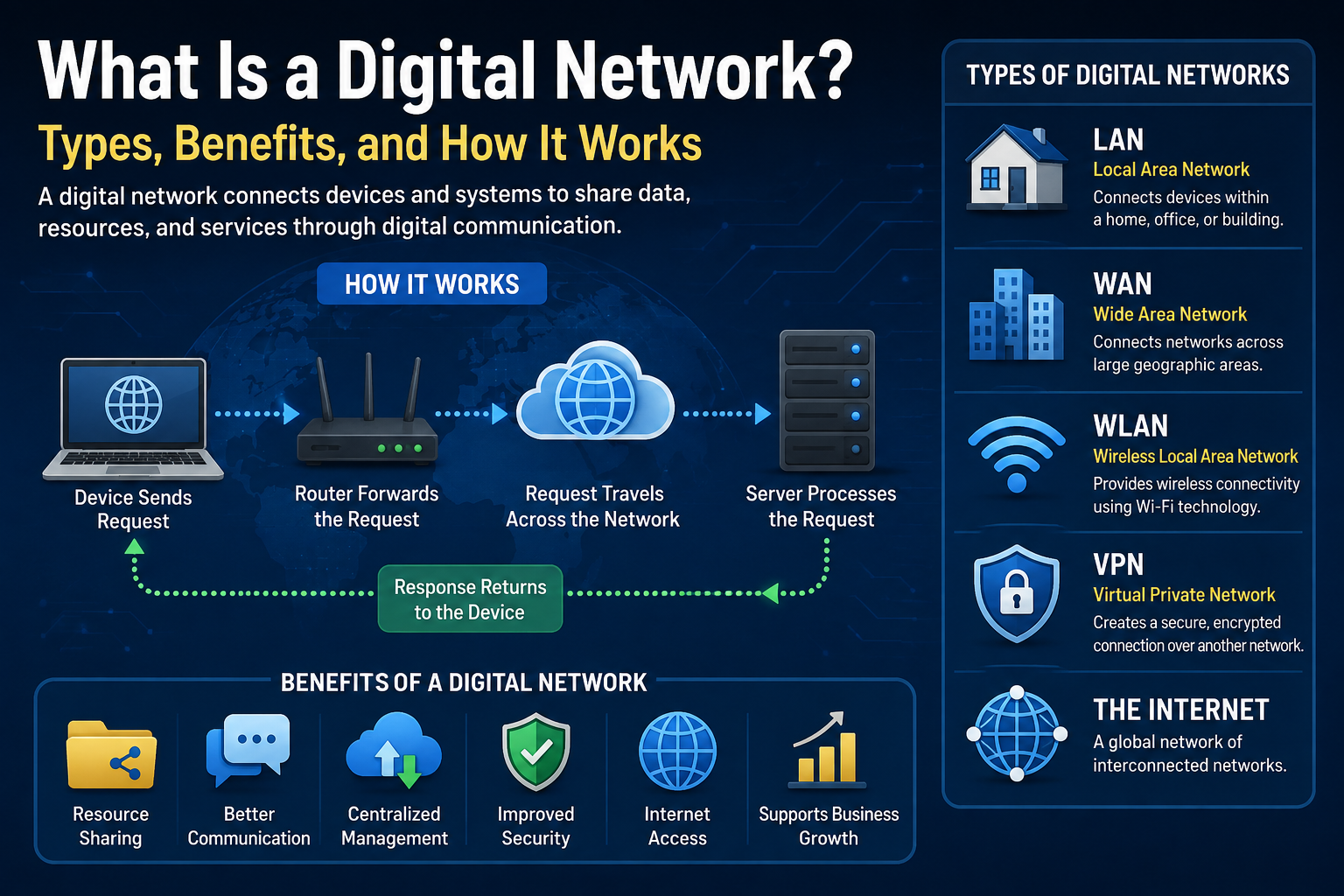
When one device needs to communicate with another, information is converted into digital data and transmitted through the network. Depending on the network, that information may travel through Ethernet cables, fiber-optic connections, Wi-Fi, mobile networks, or a combination of technologies.
A Simple Example
Imagine that an employee opens a website from an office computer.
The process may look roughly like this:
- The computer sends a request through its network connection.
- The request reaches networking equipment such as a switch and router.
- The router directs the request toward the appropriate external network.
- The destination server processes the request.
- The server sends the requested information back.
- The employee’s computer receives the data and the browser displays the website.
The complete process can happen very quickly, although actual performance depends on factors such as connection speed, network congestion, server response time, Wi-Fi quality, and equipment performance.
Essential Components of a Digital Network
A reliable digital network normally consists of several components working together.
Router
A router connects different networks and determines where network traffic should be sent.
In a typical home or small business, the router often connects the local network to an internet service provider.
Business environments may use more advanced routers with additional routing, management, redundancy, or security capabilities.
Network Switch
A switch connects multiple devices within a local network.
For example, computers, printers, servers, IP phones, and other devices can connect to an Ethernet switch.
Managed switches can provide administrators with additional control over network configuration, monitoring, segmentation, and traffic management.
Wireless Access Point
A wireless access point provides Wi-Fi connectivity to compatible devices.
Organizations with larger buildings may install multiple access points to provide sufficient wireless coverage.
Access point placement is important because walls, distance, interference, building materials, and the number of connected devices can affect Wi-Fi performance.
Network Interface
Devices require a compatible network interface to communicate.
A laptop, for example, may contain both an Ethernet adapter and a Wi-Fi adapter.
Servers
Servers provide services and resources to other devices.
Depending on the organization, servers may provide:
- File storage
- User authentication
- Business applications
- Databases
- Websites
- Email services
- Backup services
- Virtual machines
Not every network requires an organization to operate its own physical servers. Many services can also be hosted in cloud environments.
Ethernet and Fiber-Optic Cabling
Wired networks commonly use Ethernet cabling for local connections.
Fiber-optic technology is also widely used where organizations require higher capacity, longer-distance connections, or particular infrastructure characteristics.
The appropriate cabling depends on the environment, required performance, equipment, distance, and budget.
Common Types of Digital Networks
Networks can be classified according to their size, purpose, technology, and geographic coverage.
LAN — Local Area Network
A Local Area Network connects devices within a relatively limited area, such as an office, home, school, or building.
A business LAN might connect employee computers, servers, printers, IP phones, and security systems.
LANs can use wired Ethernet, wireless technology, or both.
WLAN — Wireless Local Area Network
A WLAN is a local network that uses wireless communication, commonly Wi-Fi.
Wireless networks provide flexibility because compatible devices do not require a physical network cable for every connection.
However, Wi-Fi performance can be affected by interference, distance, obstacles, configuration, and the number of users.
WAN — Wide Area Network
A Wide Area Network connects networks across larger geographic areas.
For example, an organization with offices in different cities or countries may use WAN technologies or secure internet-based connections to allow its locations to communicate.
VPN — Virtual Private Network
A Virtual Private Network can provide an encrypted connection between a device and a network, or between different networks.
Businesses commonly use VPN technologies to support remote access or communication between locations.
A VPN can improve the security of data while it is being transmitted through an untrusted network, but it does not automatically protect a device from every cybersecurity threat.
The Internet
The internet is a global system of interconnected networks.
When people access websites, cloud platforms, online applications, or internet-based communication services, their devices communicate across multiple networks before reaching the destination.
Wired vs. Wireless Digital Networks
Both wired and wireless networking have advantages.
Wired Networks
A wired network normally connects devices through Ethernet or other physical network infrastructure.
Advantages include:
- Consistent connections in properly installed environments
- Lower exposure to wireless interference
- Suitable for stationary equipment
- Easier to provide dedicated physical connections
Limitations include:
- Cabling and installation costs
- Less flexibility when moving devices
- Additional infrastructure requirements
Wireless Networks
Wireless networks allow compatible devices to connect without individual Ethernet cables.
Advantages include:
- Mobility
- Convenient smartphone and laptop connectivity
- Easier device movement
- Useful where installing cables is difficult
Limitations include:
- Wireless interference
- Signal coverage problems
- Performance variations
- Additional wireless security considerations
Many organizations use a combination of wired and wireless networking instead of choosing only one.
Benefits of a Digital Network
A properly designed digital network can provide several practical benefits.
Resource Sharing
Multiple employees can access shared resources such as printers, storage systems, applications, and servers.
This can reduce unnecessary duplication of equipment and simplify collaboration.
Communication
Networks support email, messaging, video conferencing, voice communication, and many other collaboration tools.
Centralized Management
Organizations can centrally manage certain accounts, permissions, devices, applications, and security policies.
The level of centralized management depends on the network architecture and technologies being used.
File and Data Access
Authorized users can access shared information without manually transferring files between computers.
Organizations should still implement appropriate permissions and security controls so that users only access information required for their roles.
Internet Connectivity
A network can allow many devices to share internet connectivity while administrators apply appropriate network and security policies.
Support for Business Systems
Modern businesses often depend on networks for accounting software, inventory management, customer systems, cloud applications, security cameras, access control, IP phones, and other operational technologies.
Digital Network Security
Connectivity creates opportunities for collaboration, but it also introduces security responsibilities.
A network should not be considered secure simply because it is protected by a Wi-Fi password or located inside an office.
Use Strong Authentication
Default passwords on routers, access points, cameras, switches, and other manageable devices should be changed.
Administrative accounts should use strong, unique credentials.
Multi-factor authentication should also be considered when supported and appropriate.
Keep Devices Updated
Network devices and connected systems should receive appropriate security and firmware updates.
Before updating critical infrastructure, administrators should review the manufacturer’s documentation, compatibility information, and backup procedures.
Use Firewalls
Firewalls help control traffic according to defined security rules.
They can help prevent unauthorized network connections, although a firewall is only one part of a broader security strategy.
Separate Important Systems
Not every device needs unrestricted access to every other device.
Network segmentation can separate different categories of systems, such as employee devices, guest Wi-Fi, servers, security cameras, and other equipment.
The appropriate configuration depends on an organization’s technical and security requirements.
Back Up Important Data
A network connection is not a backup.
Important business information should be protected through an appropriate backup strategy. Organizations should also periodically verify that backups can be restored successfully.
Monitor the Network
Administrators should monitor network health and investigate unusual behavior.
Monitoring may help identify issues such as unavailable devices, excessive traffic, connection failures, performance problems, or unexpected activity.
Example of a Small Business Digital Network
Consider a small company with 15 employees.
Its network could contain:
Internet connection → Router/Firewall → Network Switch → Computers, Servers, Printers and Access Points
Wireless devices would connect through the access points.
The company might also create a separate guest Wi-Fi network so visitors do not receive the same network access as employees.
The exact architecture should depend on the organization’s requirements rather than following a single design for every business.
How to Build a Reliable Digital Network
Good networking begins with planning rather than simply purchasing equipment.
1. Identify Your Requirements
Determine how many users and devices need connectivity.
Consider computers, phones, printers, cameras, servers, wireless devices, and future expansion.
2. Plan the Physical Infrastructure
Determine where routers, switches, access points, network cabinets, cables, and other equipment will be installed.
For wireless networks, coverage requirements should be considered carefully.
3. Select Appropriate Equipment
Equipment should match the organization’s actual requirements.
A small office and a large organization will normally have very different requirements for performance, management, security, capacity, and redundancy.
4. Configure Security
Change default credentials, configure appropriate access controls, review firewall rules, protect Wi-Fi, and separate systems where necessary.
Security should be part of the initial network design rather than something added only after a problem occurs.
5. Document the Network
Keep useful records of network equipment and configuration.
Documentation might include device names, IP address assignments, network diagrams, equipment locations, configuration backups, and maintenance information.
Sensitive credentials should be stored securely rather than included in ordinary network documentation.
6. Test the Network
After installation, test both wired and wireless connectivity.
Check important business applications, internet access, internal resources, printers, servers, and other required systems.
7. Maintain the Infrastructure
Networking equipment requires ongoing maintenance.
Organizations should periodically review device health, updates, backups, security settings, network capacity, logs, and physical infrastructure.
Common Digital Network Problems
Even a well-designed network can experience problems.
Slow Internet
A slow connection does not always mean the internet service itself is the problem.
Possible causes include:
- Network congestion
- Poor Wi-Fi coverage
- Interference
- Faulty equipment
- Cabling problems
- Excessive network traffic
- Device-specific issues
- Problems with an external service
Troubleshooting should identify the source before equipment or services are replaced.
Weak Wi-Fi Signal
Weak wireless coverage may result from distance, walls, interference, access point placement, or inappropriate configuration.
Adding more access points is not automatically the best solution. Wireless deployments should be planned to reduce coverage gaps and unnecessary interference.
IP Address Problems
Devices on IP networks need appropriate addressing information.
Incorrect configuration or address conflicts can prevent devices from communicating correctly.
Network Equipment Failure
Routers, switches, access points, power supplies, and cables can fail.
For important business networks, organizations should consider how an equipment failure would affect operations and whether backup equipment or redundancy is justified.
Digital Networks and Cloud Computing
Cloud computing has changed how many organizations use networks.
Instead of keeping every application and file on local servers, businesses can access services hosted in remote data centers through network connections.
Cloud services can reduce the need to operate certain infrastructure locally, but reliable connectivity becomes particularly important when critical applications depend on internet access.
Organizations should consider availability, security, costs, performance, data requirements, backup responsibilities, and vendor policies when evaluating cloud services.
Digital Network Limitations and Challenges
Digital networks provide significant benefits, but they also introduce challenges.
Organizations may need to manage:
- Equipment and installation costs
- Cybersecurity risks
- Hardware failures
- Software and firmware updates
- Network congestion
- Wi-Fi coverage
- Internet outages
- Configuration complexity
- User access permissions
- Backup and recovery
- Technical support requirements
As networks become more important to daily operations, proper maintenance and documentation become increasingly valuable.
Frequently Asked Questions
1. What is a digital network in simple terms?
A digital network is a collection of connected devices that can exchange digital information. Computers, smartphones, servers, printers, routers, and other devices can all participate in a network.
2. What is the difference between a network and the internet?
A network connects devices so they can communicate. The internet is a worldwide system connecting many different networks.
A private office LAN, for example, can operate as a network even when its internet connection is unavailable, although internet-dependent services would not work.
3. Is Wi-Fi the same as a digital network?
Wi-Fi is a technology used to connect devices wirelessly to a network. It is not the only form of networking. Ethernet, fiber, cellular technologies, and other communication methods can also be used.
4. What equipment does a small business network need?
Requirements vary, but a small business may need an internet connection, router or firewall, network switches, wireless access points, Ethernet cabling, and compatible network devices.
Additional equipment may be necessary depending on servers, phones, cameras, storage systems, security requirements, and business applications.
5. How can a business improve its network security?
Useful measures include changing default passwords, using strong authentication, installing appropriate updates, configuring firewalls, separating important systems, protecting wireless access, maintaining backups, and monitoring network activity.
Security requirements vary, so organizations handling sensitive or regulated information should consult appropriate technical guidance and relevant official requirements.
Conclusion
A digital network provides the foundation for communication between computers, smartphones, servers, printers, cloud applications, security systems, and many other technologies.
Understanding the difference between LANs, WANs, Wi-Fi, VPNs, routers, switches, servers, and other network components makes it easier to plan and maintain reliable connectivity.
For businesses, the most effective network is not necessarily the largest or most expensive. It is one that matches operational requirements, provides appropriate performance, is properly secured, can be maintained effectively, and has room to adapt as needs change.
When selecting networking technologies or configuring security-sensitive systems, always review current manufacturer documentation and relevant official technical guidance because features, standards, and recommended security practices can change.
SEO Information
SEO Title: What Is a Digital Network? Types, Benefits, and How It Works
Focus Keyword: Digital Network
Meta Description: Learn what a digital network is, how it works, its main types, components, benefits, security risks, and practical tips for reliable connectivity.
Suggested URL Slug: digital-network-guide
Related Keywords: digital networking, computer network, network infrastructure, LAN network, WAN network, wireless network, network security, routers and switches, business network, Wi-Fi network, network management, network connectivity
salut je aime votre blog, peut nous envoyer des blog comme ca chaque semaine, merci.
merci je le verai mr
[…] What Is a Digital Network? […]